How to Update and Set a New Primary Email Address (update user email)
Step 1: Access Your Account Management
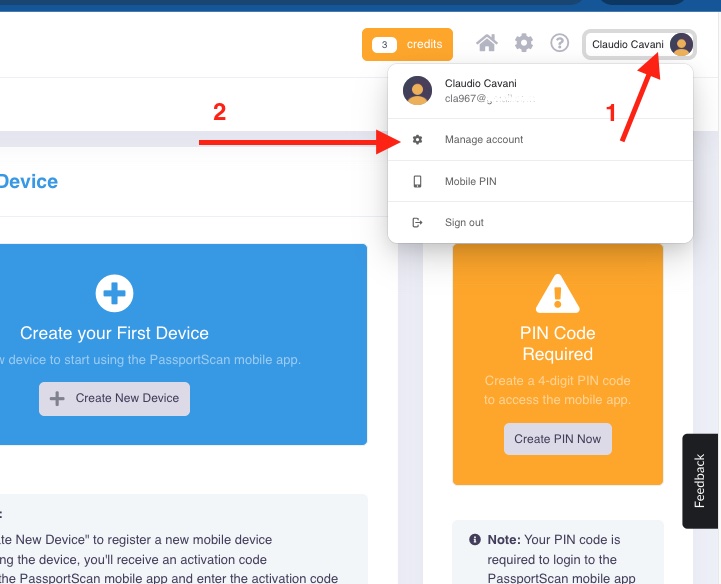
Step 2: Adding a New Email Address
Step 3: Setting the New Email as Primary
Related Articles
Login with your existing credentials with the new login method
PassportScan Cloud – Accessing Your Account After the Latest Login Update PassportScan Cloud has released the latest version of its login system — the final update in a series of improvements made over the past months to enhance security and account ...
PassportScan Cloud – New Login System with Single Sign-On (SSO)
PassportScan Cloud – New Login System with Single Sign-On (SSO) PassportScan Cloud now features a new authentication system that allows users to log in using Single Sign-On (SSO)with Google or Microsoft accounts. This update enhances security, ...
Installing PassportScan Cloud on a New PC (Windows Client)
Step by Step Guide: PassportScan Cloud Installation Guide Follow these steps to install and set up PassportScan Cloud properly. 1. Download the Installation File • Go to https://passportscan.net/passportscan_cloud.exe. • Download the ...
Esportare lista ospiti e/o consensi (file .csv)
ESPORTAZIONE DATI CLIENTI *Questa procedura è disponibile soltanto per utenti con MFA attivo* Accedendo al Workspace di PassportScan con le sue credenziali, nel menù a sinistra della pagina inziale, troverà Export. 1) Dal WS (Workspace) di ...
PassportScan Cloud Transition and Device Activation Guide
1. End of Legacy Application As of September 30, the old PassportScan app stopped working permanently. All users must now use PassportScan Cloud. All past and future check-ins remain safely stored in your Workspace; this transition does not affect or ...